
Technical SEO Checklist: 50+ Items Every Site Needs to Fix

Technical SEO Checklist: 50+ Items Every Site Needs to Fix
7 min read

Technical SEO is the foundation upon which all other SEO efforts are built. No amount of brilliant content or high-quality backlinks will help you rank if search engines cannot properly crawl, understand, and index your website.

Yet technical SEO is also where many teams struggle. The sheer number of factors to consider - from robots.txt configuration to Core Web Vitals optimization - can feel overwhelming. And with Google constantly evolving its technical requirements, staying current requires ongoing attention.

This comprehensive checklist covers 50+ technical SEO items organized into five critical categories. Use it as your reference for auditing existing sites, launching new ones, or maintaining technical health over time. Each item includes what to check, why it matters, and how to fix common issues.

Once Technical SEO is Solid, Scale Your Links

Technical optimization sets the stage for ranking. But you still need quality backlinks to compete. Outreachist connects you with verified publishers for guest posts and content placements that boost your authority.

Find Link Opportunities

What This Checklist Covers

Reading Time: 20 minutes | Difficulty: Intermediate

  • Crawlability and Indexation (12 items)
  • Site Speed and Core Web Vitals (10 items)
  • Mobile Optimization (8 items)
  • Site Architecture and Internal Linking (12 items)
  • Structured Data and Rich Results (10 items)

Section 1: Crawlability and Indexation

Crawlability and Indexing

Before search engines can rank your content, they must be able to find, crawl, and index it. Issues in this area can prevent your pages from appearing in search results entirely - making this the most critical category to address.

Critical Priority

Crawlability issues can completely prevent your site from ranking. Address these items first before moving to other technical optimizations.

Crawlability Checklist

# Check Item What to Look For How to Fix Priority
1 Robots.txt exists and is accessible Visit /robots.txt - should return 200 status Create file in root directory Critical
2 Robots.txt not blocking important pages Check Disallow directives are correct Remove incorrect Disallow rules Critical
3 XML sitemap exists Check /sitemap.xml or /sitemap_index.xml Generate with CMS plugin or tool Critical
4 Sitemap submitted to Google Search Console Check GSC Sitemaps report Submit via GSC interface Critical
5 Sitemap contains only indexable URLs No 404s, redirects, or noindex pages Clean up sitemap regularly High
6 No crawl errors in GSC Check Coverage report for errors Fix 404s, redirects, server errors High

Indexation Checklist

# Check Item What to Look For How to Fix Priority
7 Important pages are indexed site:domain.com search shows key pages Request indexing in GSC Critical
8 Canonical tags present on all pages Check <link rel="canonical"> in source Add self-referencing canonicals High
9 No duplicate content issues Same content at multiple URLs Implement canonical or 301 redirect High
10 No accidental noindex tags Check meta robots for noindex Remove noindex from important pages Critical
11 URL parameters handled correctly ?sort=, ?page= creating duplicates Canonical to base URL or noindex Medium
12 Thin content pages noindexed Low-value pages bloating index Add noindex or consolidate content Medium

Pro Tip: The Index Coverage Report

Google Search Console's Index Coverage report is your best friend for crawlability and indexation issues. Check it weekly and address any increases in errors or excluded pages promptly.

Section 2: Site Speed and Core Web Vitals
Site Speed and Performance

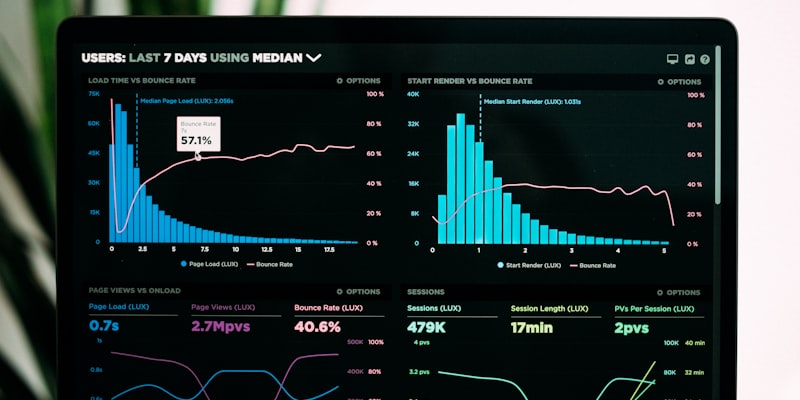
Site speed has been a ranking factor for years, but Google's Core Web Vitals have made it more important and more measurable than ever. These metrics directly impact both rankings and user experience.

Core Web Vitals Overview

LCP - Largest Contentful Paint

Measures loading performance. Time until the largest content element is visible.

Target: < 2.5s

FID - First Input Delay

Measures interactivity. Time until the page responds to first user interaction.

Target: < 100ms

CLS - Cumulative Layout Shift

Measures visual stability. How much the page layout shifts during loading.

Target: < 0.1

Speed Optimization Checklist

# Check Item What to Look For How to Fix Priority
13 LCP under 2.5 seconds PageSpeed Insights or GSC Optimize images, improve server response Critical
14 FID under 100 milliseconds PageSpeed Insights or GSC Reduce JavaScript execution time High
15 CLS under 0.1 PageSpeed Insights or GSC Set dimensions on images/videos High
16 Images optimized and compressed File sizes, formats, dimensions Compress, use WebP, lazy load High
17 Browser caching enabled Check cache headers Configure server caching rules Medium
18 GZIP or Brotli compression enabled Check response headers Enable on server Medium
19 CSS and JavaScript minified Check file sizes and content Use build tools or plugins Medium
20 CDN in use for static assets Check asset domains Implement CDN (Cloudflare, etc.) Medium
21 Render-blocking resources minimized Check PageSpeed recommendations Defer non-critical JS/CSS High
22 Server response time (TTFB) fast Target under 200ms Upgrade hosting, optimize backend High

Section 3: Mobile Optimization

Mobile Optimization

With mobile-first indexing, Google primarily uses the mobile version of your site for ranking and indexing. Mobile optimization is no longer optional - it is essential for SEO success.

Mobile-First Indexing

Google now primarily uses the mobile version of your site for indexing and ranking. If your mobile site has less content, fewer links, or technical issues, your rankings will suffer - even for desktop searches.

Mobile Optimization Checklist

# Check Item What to Look For How to Fix Priority
23 Responsive design implemented Site adapts to all screen sizes Use responsive CSS framework Critical
24 Viewport meta tag present Check for viewport in head Add <meta name="viewport"> Critical
25 Text readable without zooming Font size at least 16px base Increase font sizes High
26 Tap targets properly sized Buttons/links at least 48x48px Increase tap target sizes High
27 No horizontal scrolling required Content fits within viewport Fix responsive breakpoints High
28 No intrusive interstitials Popups blocking content on mobile Remove or make compliant High
29 Mobile and desktop content match Same content on both versions Ensure parity between versions Critical
30 Mobile page speed optimized Test on actual mobile devices Optimize specifically for mobile High

Section 4: Site Architecture and Internal Linking

Site Architecture

A well-structured site helps both users and search engines navigate your content. Internal linking distributes page authority and establishes topical relationships.

Architecture Checklist

# Check Item What to Look For How to Fix Priority
31 Logical URL structure URLs reflect site hierarchy Restructure URLs logically High
32 Shallow click depth Important pages within 3 clicks Add navigation shortcuts High
33 Breadcrumb navigation Breadcrumbs on category pages Implement breadcrumb nav Medium
34 No orphan pages Pages without internal links Add internal links to orphans High
35 HTTPS everywhere No mixed content warnings Fix all HTTP references Critical
36 301 redirects for moved content Old URLs properly redirected Implement 301 redirects High

Section 5: Structured Data

Schema Markup

Structured data helps search engines understand your content and can enable rich results that increase click-through rates.

Schema Checklist

# Check Item What to Look For How to Fix Priority
37 Organization schema Brand info marked up Add Organization schema Medium
38 Article schema on blog posts Articles properly marked up Add Article schema Medium
39 FAQ schema where appropriate FAQ content marked up Add FAQPage schema Medium
40 Schema validates without errors Test in Rich Results Test Fix validation errors High

Technical SEO Done? Now Build Links

With your technical foundation solid, build authority through quality backlinks. Outreachist connects you with publishers for guest posts and content placements.

Browse Publishers

Key Takeaways

  • Start with crawlability: If search engines cannot crawl your site, nothing else matters.
  • Core Web Vitals are essential: Site speed directly impacts rankings and user experience.
  • Mobile-first is non-negotiable: Google uses mobile versions for indexing.
  • Internal linking builds authority: Help search engines understand your site structure.
  • Structured data enables rich results: Schema markup increases click-through rates.

Conclusion

Technical SEO forms the foundation of your search strategy. Without a crawlable, fast, mobile-friendly site, even the best content will not rank. Use this checklist to audit systematically, starting with critical items first.

Schedule quarterly audits to catch new issues before they impact rankings. Technical SEO is not a one-time task - it requires ongoing attention as your site grows.


About Outreachist

Outreachist connects advertisers with quality publishers for guest posts and link building. Browse thousands of verified websites with transparent metrics.

Browse marketplace | Create account

Share this article:
S

Written by

Sarah Mitchell

Sarah Mitchell is the Head of Content at Outreachist with over 10 years of experience in digital marketing and SEO. She specializes in link building strategies and content marketing.

Live Activity

Join 2,500+ Marketers

Get quality backlinks & guest posts from verified publishers.

Start Free
Verified Sites 4.9 Rating
Need Help?

Reachie

Online

Contact Human Support

Fill in the form below and we'll get back to you via WhatsApp.